
Quick Read
- Instagram Stories now includes Meta AI-powered Restyle tools, enabling users to edit photos and videos with text prompts and preset effects.
- Users can add, remove, or change elements in media, such as accessories, backgrounds, or visual styles, directly within the Instagram app.
- The AI editing features are free, but using them requires agreeing to Meta’s AI Terms of Service, allowing Meta to analyze and modify uploaded content.
- Meta has introduced parental controls for AI features, letting parents monitor and restrict teenagers’ interactions with AI tools.
- The rollout is ongoing and regional availability may vary.
Meta AI Comes to Instagram: A Seamless Editing Revolution
Instagram has just raised the bar for creative expression. With the rollout of Meta AI-powered editing tools, users can now transform their Stories in ways that once required advanced skills or third-party apps. It’s not just about filters anymore—this is AI-driven customization, right inside Instagram’s own editing suite.
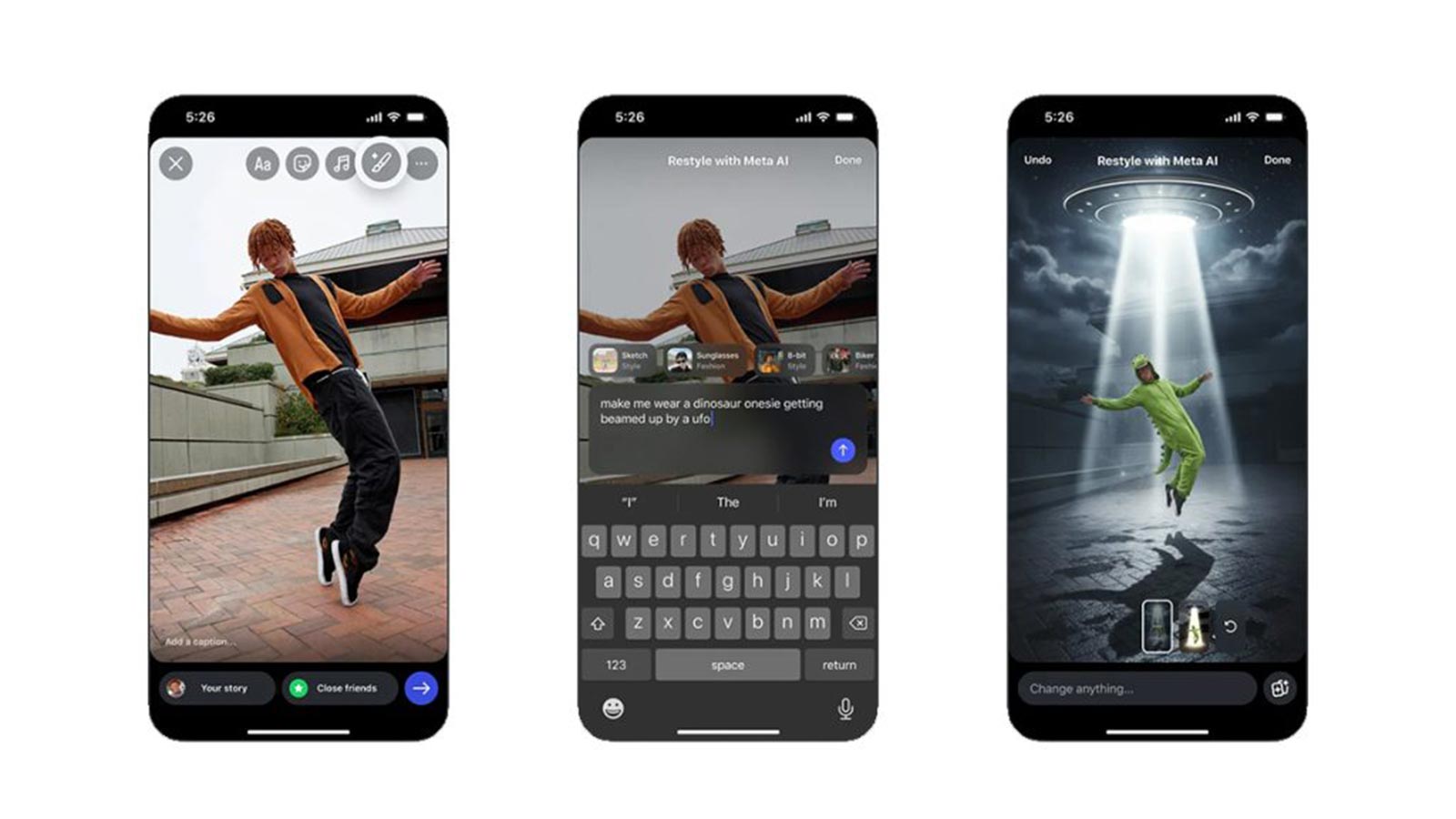
Let’s break down what’s new. The heart of this update is the Restyle feature. Accessible via the paintbrush icon in the Stories editor, Restyle brings a set of AI tools that allow users to add, remove, or change elements in their photos and videos using simple text prompts. Whether you’re aiming to swap out a dull background for a sunset glow, add playful accessories, or tweak your appearance, the possibilities are surprisingly broad.
How Restyle Works: Editing With Prompts and Presets
Editing with Meta AI on Instagram Stories is designed to be intuitive. Here’s how it plays out:
- Select your media: Tap the ‘+’ icon on your profile photo to choose a photo or video for your Story.
- After selecting your media, tap the paintbrush (Restyle) icon at the top tray of the Stories editor.
- Pick an action: Choose ‘Add’, ‘Remove’, or ‘Change’—these options let you tell Meta AI exactly what you want to do.
- Describe your vision: Type your prompt in the text bar. For example, “add a crown on top of the girl’s head” or “change the lighting to sunset glow.”
- Apply preset effects: For quick style changes, browse the preset effects above the prompt bar. These range from artistic filters (like watercolor or film noir) to accessories (sunglasses, biker jackets) and mood-altering backgrounds (outer space, Paris streets).
- Finalize and share: Once the AI generates your new image or video, tap ‘Done’ and share it to your Story or send it via DMs.
Video content isn’t left behind—users can apply effects such as simulated snowfall, flames, or entirely new landscapes. The emphasis is on speed and creativity, letting anyone—from casual users to content creators—craft unique stories in seconds.
Accessibility, Safety, and User Data
For many, the integration of AI directly into Instagram Stories is a game-changer. Before this update, such editing required either external apps or interactions with Meta’s AI chatbot—a process that was often clunky and time-consuming. Now, everything happens in one place, lowering the barrier for creative experimentation.
But with these new powers comes a need for caution. Meta specifies that using AI editing tools requires acceptance of their AI Terms of Service. When users engage with Restyle, they grant Meta permission to analyze their uploaded images and videos, including facial features, to ‘summarize image contents, modify images, and generate new content based on the image’ (Reuters). This policy is transparent, but it’s a reminder for users to be thoughtful about what they share and edit. Data privacy remains a central issue as AI becomes more embedded in our social media routines.
To address growing concerns—especially among parents—Meta has rolled out new parental controls. These allow parents to monitor and restrict their teenagers’ interactions with AI features, including disabling chats with AI characters and overseeing the use of editing tools. The move seeks to balance innovation with responsibility, giving families more control over digital activity.
Creative Potential: Tips, Trends, and Community Features
Meta isn’t just offering tools—it’s guiding users to get the best results. The company recommends writing detailed prompts to achieve the desired edits. Describing the subject, lighting, mood, composition, and style gives the AI clearer direction, resulting in more accurate and creative outputs. For example, instead of simply saying “add sunglasses,” a prompt like “add blue sunglasses to the boy’s face in the lower left corner, with a summer beach background” delivers a more precise transformation.
Instagram’s Restyle also integrates with community-driven features like ‘Add Yours’ stickers. When a user posts an AI-edited Story with this sticker, others can tap it to apply the same edit to their own media. It’s a subtle nod to virality, letting trends spread organically as users riff on each other’s creations.
The variety of available effects is impressive. Seasonal presets celebrate events like Diwali or Halloween. Artistic styles let users evoke moods ranging from photorealism to whimsical fantasy. Even the ‘remove’ feature is practical—unwanted background elements can be erased with a short instruction, making Stories cleaner and more focused.
Instagram’s AI Push: Staying Competitive in Social Media
Instagram’s embrace of generative AI editing isn’t happening in isolation. It’s part of a larger strategy by Meta to stay at the cutting edge of social media technology. The company has recently launched features like ‘Write with Meta AI’ to help users craft captions, and an AI-generated video feed called ‘Vibes’ in the Meta AI app. According to TechCrunch, these innovations have led to a surge in daily active users—from 775,000 to 2.7 million on iOS and Android within four weeks of the latest AI rollout.
For creators and brands, this means richer storytelling and faster turnaround. For everyday users, the line between professional and casual content blurs further. Editing a Story with the flair of a designer is now just a few taps away.
Global Rollout and Future Outlook
While the Restyle tools are live in many regions, Meta has not confirmed a precise global rollout schedule. Availability may differ based on where Meta AI is active. But the direction is clear: generative AI is set to become a staple in the way we create and share moments online.
Looking ahead, the implications are significant. As these tools become mainstream, will our feeds fill with ever-more stylized, AI-crafted visuals? Or will authenticity find new forms in an age where anyone can edit anything?
Instagram’s Meta AI Restyle tools are more than just a technical upgrade—they represent a shift in how people relate to their digital selves. By democratizing advanced editing and putting creative control in every user’s hands, Meta is shaping a future where imagination and technology move in step. Yet, as AI’s role expands, thoughtful engagement with privacy and authenticity will remain crucial to keeping social platforms safe, creative, and genuinely human.